War das hilfreich?
Mounting the Lifestyle Ultra Speaker | Bose Lifestyle Ultra Speaker
How are you mounting the speaker?
Using a Wall Bracket
How to mount and attach the speaker to a Wall Bracket

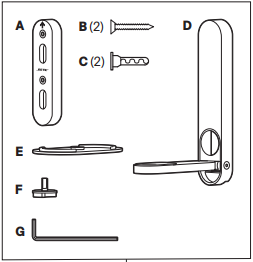
- Position the inner bracket (A) on the wall in the desired location. Use a level to make sure the bracket is straight.
- Mark the screw hole positions on the wall.
- Drill the marked holes, insert wall anchors where needed, and attach the inner bracket to the wall with the #8-18x2in screws (B).
- Drill all holes using a 1/8” drill bit. If a hole is aligned with a wall stud, this hole size is sufficient.
- For holes that do not hit a stud, widen the holes using a 3/16” drill bit and insert wall anchors (C).
- Pass the power cord through the hole in the outer bracket (D) and plug it into the speaker.
- Place the speaker on the platform (E), align it with the arm of the outer bracket, and secure it from the bottom using the lock screw (F).
- Push the outer bracket onto the inner bracket until it clicks into place.
- Loosen the lock screw to adjust the horizontal angle, then tighten it.
- Use the hex key (G) to loosen the bolt on the lower right side of the outer bracket to adjust the vertical angle, then tighten it.
Using a Floor Stand
How to mount and attach the speaker to a Floor Stand

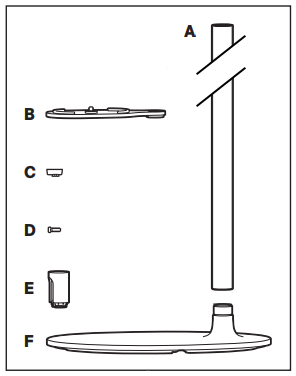
- Screw the pole (A) onto the base (F) and tighten securely.
- Feed the power cord through the hole in the bottom of the base, then up through the pole.
- Place the platform (B) onto the top of the pole, making sure to feed the power cord through the hole in the platform.
- Adjust the platform to the desired horizontal position and secure it using the screw (D).
- Plug the power cord into the back of the speaker.
- Place the speaker on the platform and tighten the mounting screw to secure it.
- Place the top cap over the exposed section of the power cord at the top of the pole and press until it clicks into place.
- Gently pull the power cord from the bottom of the base to remove any slack.