Deinstallieren Sie die Bose App und installieren Sie sie erneut.
Falls ein Problem mit der App aufgetreten ist, deinstallieren Sie sie von Ihrem Gerät, laden Sie sie erneut herunter und installieren Sie sie erneut. Versuchen Sie es dann noch einmal.
If the computer app won't open, try using SoundTouchC.exe instead.
On some computers, particularly older ones, SoundTouch.exe might not open. Instead, try using SoundTouchC.exe from the SoundTouch program folder (C:\Program Files (x86)\SoundTouch). If successful, create a shortcut for and use SoundTouchC.exe on the computer instead.
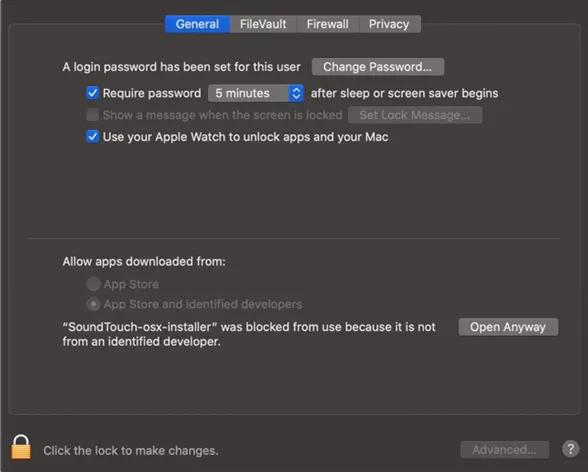
If using a Bose app for macOS 10.15 (Catalina) or newer, use one of these methods to allow the app to open.
With macOS 10.15 (also known as Catalina) or newer, an error referring to malicious software may appear when trying to open some apps—including Bose apps. This error might only allow you to choose
OK, which does not allow you to ignore the error. In these cases, do one of the following:
- On the computer, go to Finder > Applications, then right-click the Bose app and choose Open. A similar errror will appear but with the option to ignore it.
- On the computer, go to System Preferences > Security & Privacy > General tab. Under Allow apps downloaded from, select App Store and identified developers. If the Bose app is shown in this section with an Open Anyway button, click the button