Seal test does not work | Bose QuietComfort Ultra Earbuds
bose-quietcomfort-ultra-earbuds
Bose QuietComfort Ultra EarbudsVerkauft von 2023

Seal test does not work | Bose QuietComfort Ultra Earbuds

If the "You're listening to audio" message appears and you are not listening to audio, disable the touch/keyboard sounds on your mobile device.

When screen touch or keyboard feedback is enabled, the interaction sound played by the device will interfere with the CustomTune measurement process. Turn off the screen touch or keyboard feedback setting on your device, dismiss the "You're listening to audio" message, then tap Run Test.
  • On an iOS device, select Settings > Sound & Haptics > Keyboard Feedback. If the Sound setting is enabled (showing green), tap on the switch to turn the keyboard feedback sound off
  • On an Android device, Settings > Sound & Vibration > Haptics and tones > Touch sounds. If the Touch Sounds setting is enabled (showing blue), tap on the switch to turn touch sounds off

Starten Sie das Bluetooth® Gerät neu.

Elektronische Geräte wie Mobiltelefone, Tablets oder Computer müssen gelegentlich neu gestartet werden, um kleinere Probleme zu beheben. Dafür wird das Gerät normalerweise ausgeschaltet und anschließend wieder eingeschaltet.

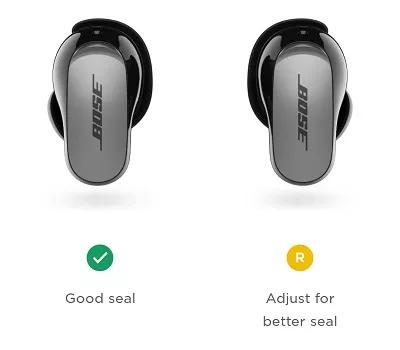
If the "Adjust for better seal" message appears, review the fitment tips.

After running the seal test, "Good seal" should appear under both earbuds. If a poor seal is detected in an earbud, try slightly rotating the earbud or gently push the earbud in to create a better seal.
in app adjust for better seal message
For other solutions to poor fitment, see Earbuds don't fit.